
TL;DR
- How does identity verification work for gig economy drivers? Document checks and selfie matching connect an applicant to an identity.
- Identity verification does not establish driving eligibility or replace background screening.
- Checktiv offers link-based identity verification for operators who want a shared-link workflow.
- Keep identity results, driving eligibility and account approval separate so drivers understand what remains.
Identity verification for gig economy drivers checks whether the person signing up matches the identity document they submit, usually through document checks, a selfie comparison and, where included, a liveness check. Passing that check establishes an identity match, not permission to drive: license eligibility, driving history, background screening and vehicle requirements are separate decisions.
Why this matters
A driver can complete an identity check and still have outstanding onboarding requirements. Treating identity verification as the entire approval process creates confusing messages for applicants and unclear decisions for your team.
Verify who the applicant is before deciding whether the applicant meets your driving requirements. Those are different questions, and each needs its own evidence.
For a 2026 onboarding review, separate identity verification from the broader process described in this background screening guide for gig economy platforms. That distinction helps you explain what each check actually establishes without promising more than the result supports.
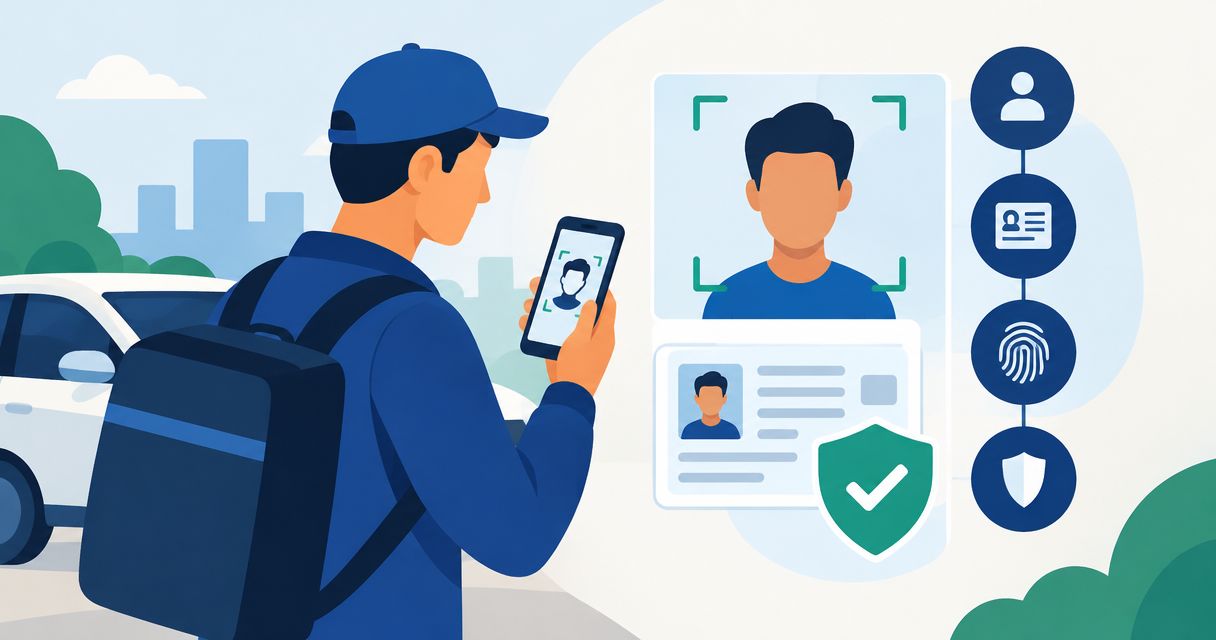
The process connects an applicant's submitted identity document to the person completing the verification. The exact screens depend on the platform and verification service, but the underlying sequence follows these steps.
- Start verification. The driver opens the platform's verification flow or a verification link. Explain the purpose before requesting documents, and identify the account or application being checked.
- Submit the document. The driver photographs an accepted identity document. Document checks assess the submitted information and look for signs that the document or image is inconsistent with expected characteristics.
- Capture the face. Where required, the driver takes a selfie or completes a face capture. A face comparison assesses whether that image matches the document portrait.
- Check presence. Where included, a liveness check assesses whether the capture comes from a live person rather than a presentation such as a photograph. Liveness and face matching answer different questions.
- Review the result. The platform uses the verification outcome to advance the application, request another submission or send the case for further review. Other onboarding requirements remain separate.
These 5 onboarding steps describe the workflow, not a universal completion time. An unclear photo, unsupported document or unresolved mismatch changes what happens next.
*An identity result is one input to the wider driver approval decision.*
The driver should receive a clear next step at the end. A successful submission is not necessarily a completed review, and a completed identity review is not necessarily permission to start accepting work.
What does each driver check establish?
Think of driver onboarding as 3 distinct checks: identity, driving eligibility and background screening. Combining their status into a single label hides the reason an application is waiting.
| Check | What it establishes | Best for | Benefit | Limitation |
|---|---|---|---|---|
| Identity verification | Whether the applicant's identity evidence matches the person completing the check | Connecting an applicant to a claimed identity | Gives the platform evidence for an identity decision | Does not establish driving history or complete account approval |
| Driving eligibility checks | Whether license and other driving requirements meet the applicable rules | Deciding whether the applicant qualifies for the driving role | Addresses the requirements specific to driving | Does not replace identity verification or every background check |
| Background screening | Relevant records assessed against the platform's screening policy and applicable rules | Evaluating screening requirements beyond identity | Adds information that document and face checks do not provide | Requires its own scope, interpretation and decision process |
A driver's license can serve as an identity document when the platform accepts it. That does not make a photograph of the license proof that the license is currently valid or meets the requirements for a particular driving role.
For your 2026 workflow, keep these statuses separate. A support agent should be able to explain whether the driver needs a clearer document image, an eligibility review or a completed background-screening decision.
What do document, selfie and liveness checks look for?
Document checks: evidence about the submitted ID
Document verification examines the submitted document and its information. Depending on the service, that can include reading document details, checking consistency and assessing visible security characteristics or signs of alteration.
The strength is structured evidence about the document. The limitation is that a document alone does not establish who is holding it during signup.
Tell drivers which documents your process accepts before they begin. Do not make applicants discover an unsupported document type only after uploading it.
Selfie comparison: evidence about the person
A selfie comparison assesses the relationship between the captured face and the portrait on the submitted document. It adds evidence that the applicant is the person represented by that document.
The strength is the connection between person and document. The limitation is that image quality and capture conditions affect the evidence available for comparison.
Give practical capture instructions: use even lighting, keep the face visible and follow the on-screen guidance. Avoid treating every failed comparison as a dishonest application.
Liveness checks: evidence about the capture
Liveness checks assess whether the face capture represents a live person rather than a presentation intended to imitate one. Depending on the process, the driver follows prompts or completes a capture without additional gestures.
The strength is an additional check on the submitted face capture. The limitation is that liveness is not a background check, a license-status check or a guarantee about future account use.
A face match and a liveness result are complementary evidence, not interchangeable labels. Explain both in plain language if your onboarding process includes them.
Why the driver verification experience varies
The exact workflow depends on what evidence the platform needs and which checks its verification service supports. These factors explain differences between verification journeys without turning them into unsupported speed or accuracy claims.
- Accepted documents. Document type and issuing country affect whether an applicant can use a particular ID in the chosen process.
- Capture quality. Glare, blur, cropped edges and poor lighting reduce the information available for assessment.
- Face-capture requirements. A selfie comparison and a liveness check add different requirements to a document-only submission.
- Information consistency. Differences between account details and submitted identity information need an explanation or correction.
- Review policy. The platform decides which outcomes advance, require another attempt or need further assessment.
- Separate onboarding requirements. License eligibility, background screening and vehicle checks affect overall approval without changing what identity verification proves.
When comparing services in 2026, ask which checks are included and what each result means. A shorter signup flow is not evidence of stronger verification, and a longer flow is not evidence of a better decision.
How should drivers prepare for an identity check?
Start with the platform's accepted-document instructions. Use the requested document, check that the submitted details match the application and photograph the document without cutting off its edges.
For a selfie, use a well-lit space and follow the capture prompts. Do not edit the image or substitute a saved photograph when the flow asks for a live capture.
If a submission fails, read the reason before trying again. A request for a clearer photo calls for a different response than a document the platform does not accept.
Use the verification route provided through the platform's official onboarding process. If an unexpected message requests identity documents, confirm the request through the platform before sending them.
Keep the distinction between 2 separate decisions clear: whether your identity is verified and whether your driver account is approved. Ask which requirement remains outstanding rather than assuming the identity check caused every delay.
How should operators handle a result that needs review?
Route the result according to its actual reason. An unreadable document image needs a capture retry; inconsistent application information needs clarification; a result requiring further assessment needs a defined review path.
Give drivers a specific, neutral explanation. Say what they need to do next without exposing unnecessary sensitive information or labeling an unresolved application as misconduct.
Your 2026 operating checklist should identify who handles exceptions, how drivers request help and which onboarding requirements remain incomplete. Keep access to identity information limited to people who need it for their work.
Do not turn an uncertain verification result into an unexplained rejection. A usable process includes both a decision path and a way to resolve submission problems.
Where does a shared-link verification workflow fit?
A shared link offers a straightforward way to ask someone to complete an identity check without building the verification experience yourself. It separates the request from the operator's review while keeping the next action easy to explain.
Checktiv is best for operators who want link-based identity verification without writing code. Checktiv provides link-based identity verification and background/fraud screening for customers that include mobility companies and marketplaces.
The benefit is a simple verification entry point. The boundary is equally important: a shared-link identity workflow is not, by itself, evidence that every driver-license, vehicle or jurisdiction-specific requirement has been satisfied.
Before using any service for driver onboarding, confirm the accepted documents, available checks, review outcomes and handling of identity information. Keep those answers separate from assumptions based on a product category or a marketing headline.
Does passing identity verification mean a driver can start work?
Passing identity verification resolves one part of onboarding, not the entire approval decision. The platform still needs to apply its driving eligibility, screening and other relevant requirements.
Tell drivers exactly which status has changed. Use language such as identity verified and application under review rather than presenting a successful identity check as permission to accept jobs.
Is identity verification the same as a driver background check?
Identity verification is not a driver background check. Identity checks connect a person to identity evidence, while background screening examines relevant records under a defined scope.
Accurate identity information supports screening, but it does not replace screening. Keep the outcomes distinct so applicants and reviewers understand the evidence behind each decision.
Should platforms verify drivers again after signup?
Platforms should define when a new identity check is required rather than assume the signup check answers every later question. A check completed during onboarding establishes evidence at that point in the process.
For 2026 policy reviews, document any repeat-check triggers and explain them to drivers. Do not describe a one-time identity check as continuous verification unless the actual workflow provides it.
One last thing
The most useful improvement is often the status message after verification. Tell drivers what passed, what remains and what they need to do next.
Replace a vague application pending message with the specific outstanding requirement. That gives the driver a clear action and keeps your team focused on the check that actually needs attention.
Related guides
- Driver background checks for mobility platforms
- Driver verification software for mobility platforms
- How long an ID verification check takes
Explore shared-link verification
See whether a link-based identity workflow fits your onboarding process.
$5 in free credit on signup · no card required.
Frequently asked questions
How does identity verification work for gig economy drivers?
Identity verification checks a submitted identity document and connects it to the person completing the process, commonly through a selfie comparison and, where included, liveness checks. The platform reviews the result separately from driving eligibility and other onboarding requirements.
Why do I need a selfie if I already uploaded my driver's license?
A selfie gives the platform evidence that the person completing the check matches the portrait on the submitted license. A document image alone does not establish who is using it.
What happens if my identity verification fails?
The next step depends on the reason for the result. Follow instructions for a clearer capture, an accepted document or further review rather than repeatedly submitting the same evidence.
Can I start driving as soon as my identity is verified?
Identity verification alone does not establish that you can start driving. Your platform must also complete its other approval requirements and confirm your account status.
How long does identity verification take for a gig driver?
Completion time depends on the verification flow, capture quality and whether further review is required. Check the platform's current instructions rather than assuming a universal turnaround time.
Does identity verification check my driving history?
Identity verification does not by itself check your driving history. Driving-record checks are a separate part of eligibility or screening when the platform requires them.
Can Checktiv support a shared-link identity verification process?
Checktiv provides link-based identity verification and background/fraud screening, with mobility companies and marketplaces among its stated customer categories. Confirm the checks and requirements for your driver workflow before treating it as a complete approval process.